

When building internet services that demand speed, resilience, and global accessibility, routing architecture is paramount. One powerful technique employed by modern infrastructure platforms is anycast.
Anycast enables multiple servers across diverse geographic locations to share the same IP address. Rather than directing traffic to a single endpoint, internet routing dynamically routes users to the nearest or optimal network path.
Major platforms like Cloudflare, Google, and Akamai leverage anycast to handle billions of daily requests with minimal latency.
In this guide, we’ll explore how anycast functions, its advantages on bare metal infrastructure, and a step-by-step deployment using BGP.
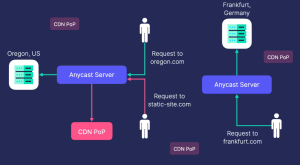
What Is Anycast? (In Simple Terms)
Anycast is a networking method where multiple servers advertise the identical IP address to the global internet.
When a user connects to that IP:
- Internet routers select the optimal route.
- Traffic is directed to the closest server.
- Users seamlessly connect to the nearest location.
This is facilitated by the Border Gateway Protocol (BGP), the core routing protocol governing inter-network communication on the internet.
BGP eliminates the need for manual traffic direction, allowing the global routing infrastructure to decide automatically.
Example
Suppose you operate servers in:
- Amsterdam
- New York
- Singapore
All advertise the same IP address, such as:
203.0.113.10
A user in Germany would be routed to Amsterdam, while one in California might connect to New York. If the Amsterdam server fails, BGP automatically reroutes to the next viable node.
This provides built-in failover without relying on a traditional load balancer.
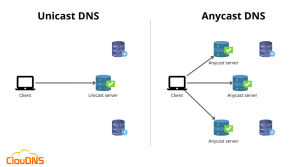
In a traditional unicast setup, traffic is routed to a single server, whereas Anycast allows multiple servers to share the same IP address, directing users to the nearest available node.
Why Anycast Works Well on Bare Metal
While Anycast can be deployed in cloud environments, it often performs best on bare metal servers. Bare metal provides direct access to hardware and networking, allowing operators to fully control routing behavior and optimize performance.
This level of control is especially valuable when working with BGP-based Anycast deployments, where routing policies and network performance directly impact latency and availability.
Key Advantages
Superior Performance Bare metal eliminates virtualization overhead, allowing the network stack to run directly on hardware for maximum efficiency.
Full Network Control Operators can configure routing behavior without cloud networking restrictions, including:
- BGP routing policies
- IP prefix announcements
- traffic engineering strategies
Consistent Latency Without hypervisors or shared network resources, bare metal environments avoid the “noisy neighbor” problem, resulting in more predictable performance.
Scalability and Cost Efficiency For high-traffic workloads, dedicated servers can often deliver better price-to-performance compared to large cloud instances.
Many infrastructure providers – such as Netrouting – offer bare metal servers with high-bandwidth connectivity and support for advanced networking setups, making them well suited for global Anycast deployments.
These characteristics make bare metal a strong choice for services such as CDNs, DNS platforms, and edge APIs that require low latency and high reliability.
Essential Components for Deployment
Before deploying Anycast, make sure the following components are available.
ASN (Autonomous System Number)
An ASN identifies your network on the internet and allows it to participate in BGP routing.
These are issued by regional registries such as:
- ARIN
- RIPE NCC
- APNIC
Example:
AS64512
Public IP Prefix
You will need a globally routable IP block. For IPv4, a /24 prefix is the smallest routable block widely accepted on the global internet, as smaller prefixes are typically filtered by upstream ISPs.
Example:
203.0.113.0/24
Distributed Server Locations
Anycast works best when servers are deployed across multiple geographic regions.
Example setup:
| Location | Role |
|---|---|
| Amsterdam | EU Node |
| New York | US East |
| Los Angeles | US West |
| Singapore | Asia Node |
Each node runs the same service and advertises the same IP address.
BGP Routing Software
Servers need software capable of establishing BGP sessions and announcing routes.
Common options include:
| Software | Notes |
|---|---|
| FRRouting | Most widely used and feature-rich |
| BIRD | Lightweight and efficient |
| OpenBGPD | Security-focused implementation |
For most deployments, FRRouting (FRR) is the easiest starting point.
Basic Anycast Flow
A typical Anycast deployment works like this:
- Multiple servers advertise the same IP prefix.
- BGP propagates those routes across the internet.
- Routers select the best or shortest path.
Result:
No centralized load balancer is required, and traffic naturally reaches the closest available server.
Step-by-Step Deployment Guide
Here’s a streamlined example for deploying anycast.
Step 1: Install FRRouting
On an Ubuntu-based bare metal server:
sudo apt update
sudo apt install frr frr-pythontools
Enable the BGP daemon by editing /etc/frr/daemons:
bgpd=yes
Restart the service:
sudo systemctl restart frr
Step 2: Configure the Anycast IP
Assigning the Anycast IP to the loopback interface ensures the address remains reachable even if the physical network interface resets or changes state. This is a standard practice in Anycast deployments.
Example:
sudo ip addr add 203.0.113.10/32 dev lo
This ensures the server processes traffic for that IP.
Step 3: Configure BGP
Edit /etc/frr/frr.conf
router bgp 64512
 bgp router-id 10.0.0.1

 neighbor 192.0.2.1 remote-as 65000

 address-family ipv4 unicast
  network 203.0.113.0/24
 exit-address-family
The network 203.0.113.0/24 statement announces the entire prefix to the upstream provider.
Although the service runs on 203.0.113.10, the /24 prefix must be announced so that global routers accept the route.
Key settings explained:
| Setting | Purpose |
|---|---|
| router bgp | Your ASN |
| router-id | Unique router identifier |
| neighbor | Upstream provider details |
| network | Announced prefix |
Restart FRR:
sudo systemctl restart frr
The BGP router-id must be unique for each node in the Anycast network.
This identifier is used by BGP internally and does not need to be publicly routable.
Step 4: Verify BGP Connectivity
Check session status:
vtysh -c "show ip bgp summary"
Look for:
| Neighbor | AS | State |
|---|---|---|
| 192.0.2.1 | 65000 | Established |
This command shows the full BGP routing table and confirms that the announced prefix is being advertised correctly.
An “Established” state confirms successful peering.
Step 5: Run Your Service on the Anycast IP
Bind your application to the shared IP. Common services include DNS, web servers, or APIs.
For Nginx as a web server:
server {
    listen 203.0.113.10:80;
    location / {
        return 200 "Hello from Anycast node";
    }
}
Replicate this setup across all nodes.
Step 6: Deploy Across Multiple Locations
Apply the identical configuration in each data center. All nodes must:
- Use the same anycast IP.
- Announce the same prefix.
- Host the same service.
The internet will handle routing to the optimal node.
Monitoring Your Anycast Setup
Effective operation requires robust monitoring. Monitoring should also track BGP session state and prefix announcements, as route withdrawal will immediately affect global traffic routing. Recommended tools:
| Tool | Purpose |
|---|---|
| Prometheus | Metrics collection |
| Grafana | Visualization dashboards |
| Netdata | Real-time performance insights |
Monitor:
- BGP session stability
- Latency and packet loss
- Node uptime
- Traffic patterns
Best Practices for Anycast
Prioritize Stateless Services
Anycast works best with stateless applications, where each request can be handled independently without requiring session persistence. Common examples include:
- DNS resolution
- HTTP APIs
- CDN edge nodes
Avoid tightly stateful services such as persistent database connections, since traffic may reach different nodes between requests.
Implement Health Checks
- Ensure traffic is not routed to unhealthy nodes by implementing monitoring and automated failover mechanisms. Common approaches include:
- Automated route withdrawal – health-check systems can remove the announced prefix from BGP if the service fails, ensuring the node stops receiving traffic.
- Monitoring scripts – scripts regularly check application health and trigger routing changes when failures are detected.
- Dynamic BGP updates – routing announcements can be adjusted automatically based on service availability.
Address Traffic Imbalances
Traffic distribution in Anycast networks is rarely perfectly even. Routing decisions depend on factors such as:
- network topology
- ISP peering agreements
- routing policies
Traffic engineering techniques, such as AS path prepending, can be used to influence routing and help balance traffic across nodes.
Real-World Anycast Applications
Anycast underpins critical internet services.
Final Thoughts
Implementing anycast on bare metal with BGP empowers you to create scalable, globally resilient infrastructure.
By dispersing servers and sharing IPs, you achieve:
- Automated routing
- Inherent redundancy
- Reduced latency
- Enhanced reliability
While it demands networking expertise, the payoff is infrastructure ready for internet-scale demands.
For teams looking to build global Anycast infrastructure, bare metal servers from Netrouting provide the dedicated performance and networking flexibility needed to deploy scalable edge architectures.