

A practical, end-to-end guide for building reliable, scalable, and production-ready storage
Ceph on Proxmox VE is often perceived as complex at first glance, but when implemented correctly, it becomes one of the most powerful storage solutions available for virtualized environments. For teams running dedicated servers, Ceph removes the dependency on external SANs while delivering high availability, scalability, and resilience.
This guide provides a clear, technical, documentation-style walkthrough – covering planning, hardware requirements, networking, installation, configuration, and operational best practices – so you can deploy Ceph confidently in real-world production environments.
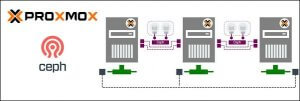
1. What Is Ceph and Why Use It with Proxmox VE?
Ceph is a distributed storage platform designed to store data reliably across multiple nodes while automatically handling replication, recovery, and scaling.
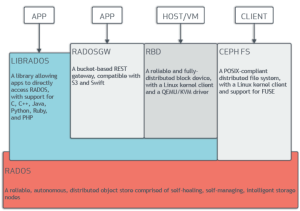
Ceph provides three primary storage types:
- Block storage (RBD) for virtual machine disks
- Object storage (RGW) compatible with S3 and Swift APIs
- File storage (CephFS) for shared filesystem use cases
Proxmox VE integrates Ceph directly into its management layer, allowing administrators to create and manage shared storage without relying on NFS or iSCSI. This tight integration simplifies deployment while enabling advanced features such as live migration, HA, and automated recovery.
2. When Ceph Is the Right Choice
Ceph is most effective when deployed in environments that can fully leverage its distributed design.
Ceph is well suited when:
- At least three dedicated servers are available
- High availability for virtual machines is required
- Storage capacity is expected to grow over time
- Data protection at both disk and node level is needed
Ceph may not be suitable when:
- Only one or two servers are available
- Ultra-low latency is required without replication overhead
- Network bandwidth or disk resources are limited
Understanding these boundaries helps avoid unnecessary complexity.
3. Hardware Requirements
3.1 Node Specifications
Each Proxmox node must provide sufficient compute and memory resources to support both Ceph and virtual machine workloads.
| Component | Minimum | Recommended |
|---|---|---|
| Nodes | 3 | 5+ |
| CPU | 8 cores | 16–32 cores |
| RAM | 32 GB | 64–128 GB |
| OS Disk | SSD | NVMe |
A general guideline is to allocate approximately 1 GB of RAM per 1 TB of raw Ceph storage, in addition to memory required for the host OS and VMs.
3.2 Storage Disks
Ceph stores data using Object Storage Daemons (OSDs), each typically mapped to a single physical disk.
Key requirements:
- Disks must be presented as raw devices
- Hardware RAID must be disabled (HBA or IT mode)
- One OSD per physical disk is recommended
Common disk roles:
- HDDs for capacity-oriented pools
- SSDs for balanced performance
- NVMes for latency-sensitive workloads
Operating system disks should always be separate from Ceph storage disks, and disk types should not be mixed within the same pool.
3.3 Networking Requirements
Ceph is heavily dependent on network performance, especially during recovery and rebalancing operations.
Minimum configuration:
- Two 1 Gbps interfaces (testing only)
Recommended configuration:
- 10 Gbps or 25 Gbps networking
- Dedicated networks for different traffic types:
- Public network for client and VM access
- Cluster network for OSD replication and recovery
Proper network design is critical to maintaining consistent performance.
4. Network Design for Ceph on Proxmox
Separating Ceph traffic from VM traffic prevents storage operations from impacting guest workloads.
Example configuration:
| Bridge | Purpose | Example Subnet |
|---|---|---|
| vmbr0 | Public / VM traffic | 192.168.1.0/24 |
| vmbr1 | Ceph cluster traffic | 10.10.10.0/24 |
This separation improves recovery speed, reduces congestion, and increases overall cluster stability under load.
5. Preparing Proxmox VE Nodes
Before installing Ceph, all Proxmox nodes must be correctly prepared to ensure a smooth deployment.
Each node should:
- Run the same Proxmox VE version
- Have correct hostname and DNS resolution
- Use time synchronization (Chrony or NTP)
- Allow passwordless SSH between nodes
Disk readiness must also be verified:
lsblk
OSD disks must be empty, unmounted, and free of partitions or filesystems.
6. Installing Ceph Using Proxmox VE
Step 1: Install Ceph Packages
From the Proxmox web interface:
- Navigate to Datacenter → Ceph → Install Ceph
- Select and install the same Ceph release on all nodes
This installs all required Ceph components.
Step 2: Create Monitor Nodes (MON)
Ceph monitors maintain cluster state and quorum.
- Go to Datacenter → Ceph → Monitor
- Create the first monitor
- Repeat until at least three MONs exist
An odd number of monitors ensures quorum reliability.
Step 3: Deploy Manager Daemons (MGR)
Ceph managers handle metrics, dashboards, and background services.
In modern Proxmox versions, managers are created automatically and require minimal configuration.
Step 4: Configure Ceph Networks
Define network ranges used by Ceph:
Public Network: 192.168.1.0/24

Cluster Network: 10.10.10.0/24
This ensures traffic is routed over the correct interfaces.
Step 5: Create OSDs
OSDs are created directly from the Proxmox interface:
- Navigate to Ceph → OSD → Create
- Select node and disk
- Optionally assign NVMe devices for BlueStore DB/WAL
Each disk becomes an independent storage unit within the cluster.
7. Creating Ceph Pools for Virtual Machines
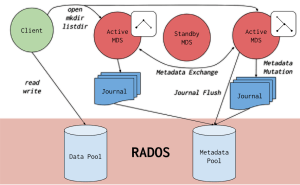
Ceph pools define how data is stored and replicated.
Key parameters:
- Size: number of replicas (commonly 3)
- Min_size: minimum replicas required for I/O (commonly 2)
Typical pool layout:
| Pool | Purpose |
|---|---|
| rbd | VM disks |
| rbd-fast | High-performance VMs |
| backups | Backup storage |
Pools are added to Proxmox under Datacenter → Storage → RBD.
8. Performance Tuning and Optimization
Performance tuning ensures Ceph operates efficiently under load.
Key practices include:
- Using replication size appropriate for workload
- Assigning fast media (SSD/NVMe) to performance pools
- Using dedicated DB/WAL devices for BlueStore
- Avoiding overfilled pools
CRUSH rules should be used to separate disk classes so data is placed only on appropriate storage media.
9. Monitoring and Health Management
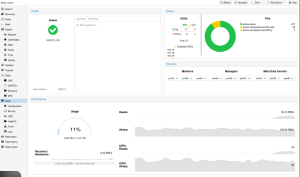
Ongoing monitoring is essential for cluster stability.
Available tools:
- Proxmox Ceph dashboard
- Command-line utilities such as:
- ceph -s
- ceph osd tree
- ceph health detail
Administrators should regularly monitor disk usage, recovery operations, network latency, and cluster warnings.
10. Backup Strategy and Failure Handling
Ceph protects against hardware and node failures through replication, but it is not a backup solution.
Ceph handles:
- Disk failures
- Node outages
- Data consistency
Ceph does not replace:
- VM-level backups
- Off-site replication
Always combine Ceph with snapshot schedules and external backup systems such as Proxmox Backup Server.
11. Common Mistakes to Avoid
Frequent issues include:
- Using RAID instead of raw disks
- Deploying on insufficient network bandwidth
- Mixing disk types in the same pool
- Under-provisioning RAM
- Skipping network separation
Avoiding these pitfalls significantly improves long-term stability.
Conclusion
Deploying Ceph on Proxmox VE dedicated servers enables a self-healing, scalable, enterprise-grade storage platform without external storage dependencies. When designed with the right hardware, networking, and pool strategy, Ceph delivers consistent performance, resilience, and flexibility for modern virtualized workloads.
If you’re unsure how to size or design your Ceph cluster, you don’t need to figure it out alone – Netrouting engineers are happy to help you plan a setup that fits your workload and growth needs.